
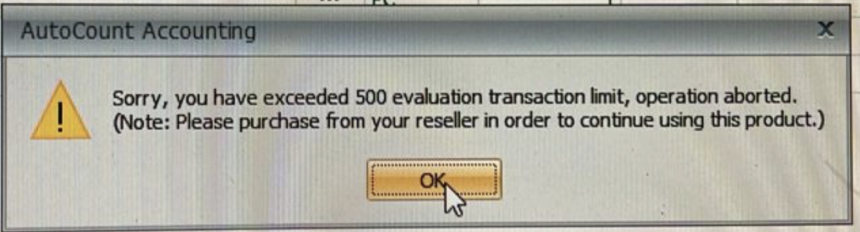
Is your AutoCount License suddenly showing as disabled or not detected? This is a common issue that many users encounter, especially if the computer has been offline for several days. AutoCount requires periodic internet connectivity to verify your software authorization status. If the system stays offline for too long, the license may become inactive.
Don’t worry—your data is perfectly safe. In this post, we will walk you through the simple steps to reactivate your license and get your accounting system back online.
Why Does This Happen?
AutoCount uses a secure online validation system to ensure your license remains genuine and up to date. When your server or PC is disconnected from the internet for an extended period, the AutoCount License server cannot “heartbeat” with the central system. This triggers a temporary deactivation as a security measure.
Step-by-Step Guide to Fix Your **AutoCount License**
Step 1: Access License Settings
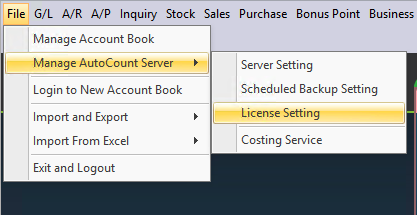
Login to any of your account books in the AutoCount system. Once logged in, navigate to the top menu and select File > Manage AutoCount Server > License Setting.
Step 2 : Authenticate with Your Server Password
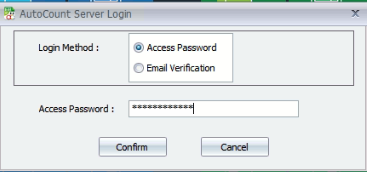
A prompt will appear asking for your license server password. If you are unsure of this password, you may refer to your authorized dealer for assistance. Input the password to proceed.
(You may refer to your dealer about your license server password)
Step 3: View License Status
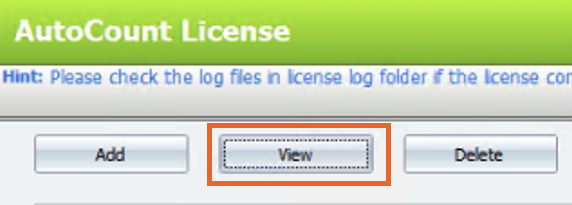
Once inside the License Setting window, click on the “View” button.
Step 4: Perform Online Activation
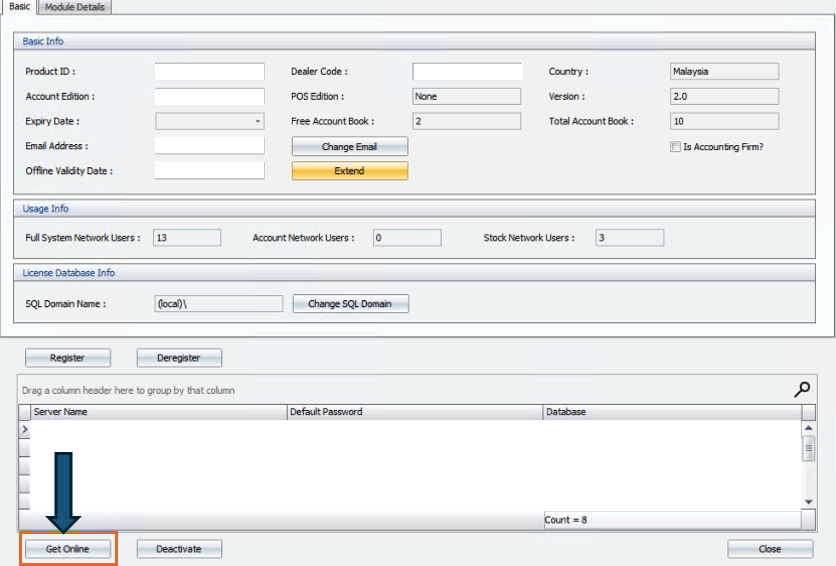
Click the “Get Online” button. The system will attempt to connect to the AutoCount server to refresh your license. Once successful, close the window, log out, and re-login to your AutoCount system. You will see that your license status has returned to normal.
As a leading provider of AutoCount accounting and POS solutions in Malaysia, EZSOFT SDN BHD is here to ensure your business operations run smoothly. If you are still unable to find your missing icons or need help with e-invoicing integration, our technical team is ready to assist.
Need more help on AutoCount system? Contact us via WhatsApp or visit our Contact Us page for more professional software tutorials.